★ FREE DELIVERY OVER $99AUTHENTIC OVERSTOCKNEW BINS RESTOCKED WEEKLY2 LONDON LOCATIONSUP TO 90% OFF RETAIL★ FREE DELIVERY OVER $99AUTHENTIC OVERSTOCKNEW BINS RESTOCKED WEEKLY2 LONDON LOCATIONSUP TO 90% OFF RETAIL★ FREE DELIVERY OVER $99AUTHENTIC OVERSTOCKNEW BINS RESTOCKED WEEKLY2 LONDON LOCATIONSUP TO 90% OFF RETAIL★ FREE DELIVERY OVER $99AUTHENTIC OVERSTOCKNEW BINS RESTOCKED WEEKLY2 LONDON LOCATIONSUP TO 90% OFF RETAIL
← Back to shopping
Master liquidation
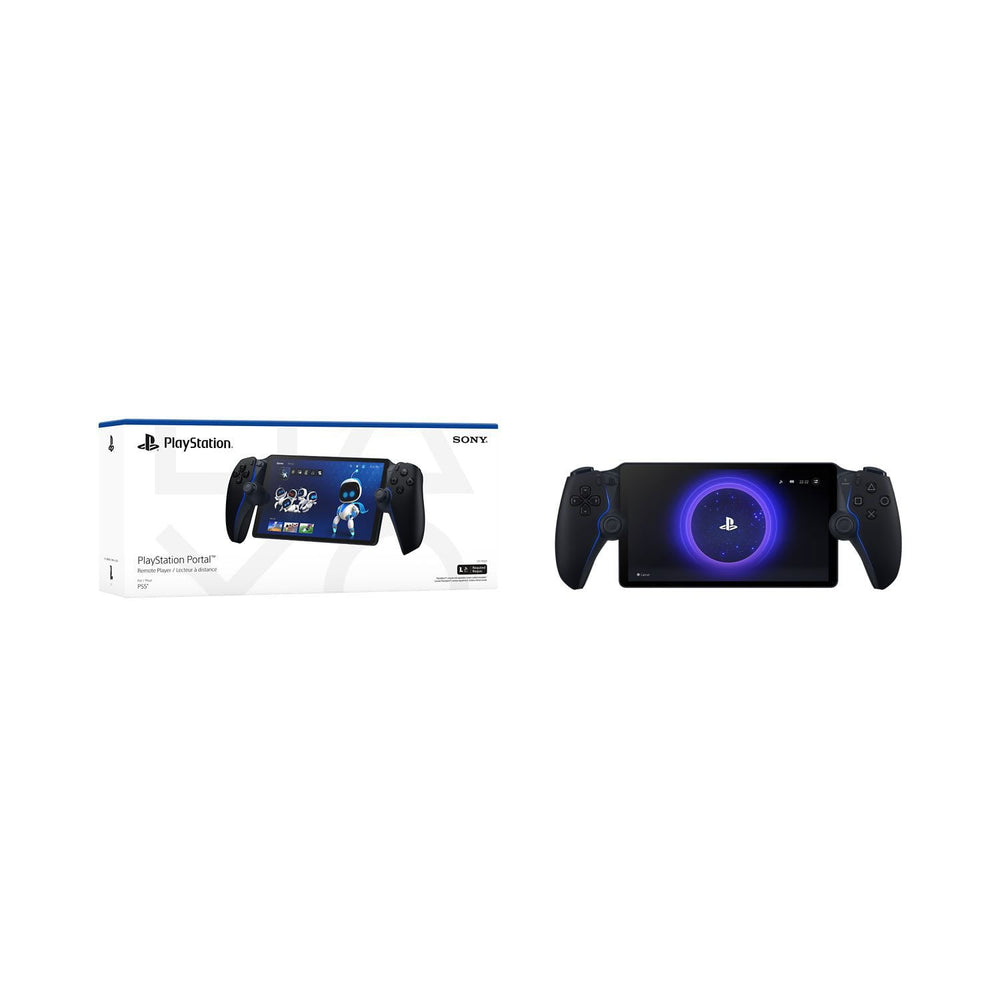
Sony Portal Remote Player for PS5 – Midnight
$279.11
● In stock, ready to ship
Want a better price? Use the Make an Offer button to name your price.
✓ Free delivery over $99✓ 30-day returns✓ 100% authentic
Brand: PlayStation
Condition: Open Box - Tested
In Packaging?: Yes
Assembly Required?: No
Damaged?: No
Functional?: Yes
Missing Parts?: No
Star Rating: 0.0
UPC: 711719588269
Title: Sony Portal Remote Player for PS5 Midnight
Put Your PS5 in the Palm of Your Hand: PlayStation Portal Remote Player gives you access to the games on your PS5 console2over a Wi-Fi network,1letting you jump into gaming on a gorgeous 8" LCD screen capable of 1080p resolution play at 60fps,3 all without needing to play on a TV. Play Your Game Collection with Remote Play: PlayStation Portal Remote Player can play compatible games you have installed on your PS5 console, including your favorite games for PS5 and PS4.2 Enjoy Cloud Streaming for PS5 Games with PlayStation Plus Premium5: Stream select titles from the Game Catalog6, Classics Catalog6, and even select digital PS5 games in Your Library7 from PlayStation Store, without needing to wait for downloads. Experience Breathtaking Immersion with DualSense Wireless Controller Features and 3D Audio: Feel the incredible immersion of haptic feedback and adaptive triggers in supported games,4 and surround yourself with sound via Tempest 3D AudioTech in supported games when a compatible audio device is connected. PlayStation Portal Remote Player Play your PS5 console over Wi-Fi with console quality controls using PlayStation Portal Remote Player.1 Put Your PS5 in the Palm of Your Hand PlayStation Portal Remote Player gives you access to the games on your PS5 over a Wi-Fi network,1 letting you jump right into gaming without needing to play on a TV. Play Your Game Collection with Remote Play PlayStation Portal Remote Player can play compatible games you have installed on your PS5 console, including your favorite games for PS5 and PS4.2 Cloud Streaming from the Game Catalog and Classics Catalog5 Discover an awesome library of PS5 games on the PlayStation Portal Remote Player with PlayStation Plus Premium. Access hundreds of games from the Game Catalog6 and Classics Catalog6, streamed directly to your PlayStation Portal Remote Player with new games added every month. Cloud Streaming for PS5 Games in Your Library7 With PlayStation Plus Premium5, stream select digital PS5 games in Your Library from PlayStation Store directly to your PlayStation Portal Remote Player, with no downloads required. Enjoy instant access to some of the latest and greatest PS5 games in the palm of your hand. Experience Breathtaking Immersion with DualSense Wireless Controller Features Feel the immersive power of haptic feedback and adaptive triggers in supported games.4 Responsive vibrations react to your in game choices and simulate environmental factors. Dynamic resistance mimics the tension of interactions with in game gear and objects in select PS5 games. Tempest 3D AudioTech Surround yourself with sound via Tempest 3D AudioTech on PlayStation Portal Remote Player. Experience realistic, immersive audio in supported PS5 games when a compatible audio device is connected, either wirelessly via PlayStation Link or wired via the 3.5mm audio jack. Beautiful 8" LCD Screen Take in every exquisite detail of your favorite games as they come alive on a brightly lit and gorgeous full HD screen. 60fps Capable at 1080p Resolution PlayStation Portal Remote Player can deliver silky smooth gameplay at up to 60fps with high image clarity on its 1080p resolution screen.3 Get Gaming Fast PlayStation Portal Remote Player is a purpose-built device dedicated to delivering an incredible remote play experience. That means you can turn it on, press a button to connect to your PS5 console and get right to playing with remarkable speed. Specifications What's Included: PlayStation Portal Remote Player Midnight Black USB Cable Printed Materials FAQ Question: Can PlayStation Portal Remote Player only be played on my home Wi-Fi network? Answer: While your home Wi-Fi network represents a great option to use PlayStation Portal Remote Player because you have control over the quality of your own home Wi-Fi, it is not required. PlayStation Portal Remote Player can also be played wherever you have access to broadband internet Wi-Fi with at least 5Mbps for use.1 For a better play experience, a high-speed connection of at least 15Mbps is recommended. If you are using public Wi-Fi, be aware that the quality of the internet connection may be out of your control and could impact the quality of your play experience. Question: Is a PlayStation Plus membership required to use PlayStation Portal Remote Player and PlayStation Remote Play? Answer: No, using PlayStation Portal Remote Player and PlayStation Remote Play does not require a PlayStation Plus membership.2 If you are using Remote Play to play a game that requires a PS Plus membership to access multiplayer, then you would need to have an active membership to access that game's multiplayer features. You will need an active PlayStation Plus Premium membership to access Cloud Streaming for PS5 Games on PlayStation Portal Remote Player5 Question: Can someone else use the TV my PS5 is connected to while I am using PlayStation Portal Remote Player? Answer: Yes, they can. For example, someone else in your household could be watching a show or a movie on the TV while you use PlayStation Portal Remote Player to play your favorite compatible games on its gorgeous 8" HD screen. Question: What audio devices work with the PlayStation Portal Remote Player? Answer: You can connect audio devices that have a 3.5mm jack audio cable or feature PlayStation Link wireless technology such as the PULSE Explore wireless earbuds and PULSE Elite wireless headset. You also have the option to listen to audio via the remote player's built-in speakers, although 3D Audio isn't supported. Question: Where can I use the PlayStation Portal Remote Player? Answer: While your home Wi-Fi network represents a great option to use PlayStation Portal Remote Player because you have control over the quality of your own home Wi-Fi, it is not required. PlayStation Portal Remote Player can also be played wherever you have access to broadband internet Wi-Fi with at least 5Mbps for use1. For a better play experience, a high-speed connection of at least 15Mbps is recommended. If you are using public Wi-Fi, be aware that the quality of the internet connection may be out of your control and could impact the quality of your play experience. Question: Can the PlayStation Portal Remote Player be connected to public Wi-Fi networks? Answer: PS Portal can connect to a range of public Wi-Fi networks, and those running system software version 3.0.1 or later can also connect to select Wi-Fi networks that require additional validation steps beyond entering the network password. Please note your smartphone or tablet will be required to complete these additional validation steps, and that before connecting to public Wi-Fi networks, you'll need to have completed the initial PS Portal setup on your home Wi-Fi network.
Condition: Open Box - Tested
In Packaging?: Yes
Assembly Required?: No
Damaged?: No
Functional?: Yes
Missing Parts?: No
Star Rating: 0.0
UPC: 711719588269
Title: Sony Portal Remote Player for PS5 Midnight
Put Your PS5 in the Palm of Your Hand: PlayStation Portal Remote Player gives you access to the games on your PS5 console2over a Wi-Fi network,1letting you jump into gaming on a gorgeous 8" LCD screen capable of 1080p resolution play at 60fps,3 all without needing to play on a TV. Play Your Game Collection with Remote Play: PlayStation Portal Remote Player can play compatible games you have installed on your PS5 console, including your favorite games for PS5 and PS4.2 Enjoy Cloud Streaming for PS5 Games with PlayStation Plus Premium5: Stream select titles from the Game Catalog6, Classics Catalog6, and even select digital PS5 games in Your Library7 from PlayStation Store, without needing to wait for downloads. Experience Breathtaking Immersion with DualSense Wireless Controller Features and 3D Audio: Feel the incredible immersion of haptic feedback and adaptive triggers in supported games,4 and surround yourself with sound via Tempest 3D AudioTech in supported games when a compatible audio device is connected. PlayStation Portal Remote Player Play your PS5 console over Wi-Fi with console quality controls using PlayStation Portal Remote Player.1 Put Your PS5 in the Palm of Your Hand PlayStation Portal Remote Player gives you access to the games on your PS5 over a Wi-Fi network,1 letting you jump right into gaming without needing to play on a TV. Play Your Game Collection with Remote Play PlayStation Portal Remote Player can play compatible games you have installed on your PS5 console, including your favorite games for PS5 and PS4.2 Cloud Streaming from the Game Catalog and Classics Catalog5 Discover an awesome library of PS5 games on the PlayStation Portal Remote Player with PlayStation Plus Premium. Access hundreds of games from the Game Catalog6 and Classics Catalog6, streamed directly to your PlayStation Portal Remote Player with new games added every month. Cloud Streaming for PS5 Games in Your Library7 With PlayStation Plus Premium5, stream select digital PS5 games in Your Library from PlayStation Store directly to your PlayStation Portal Remote Player, with no downloads required. Enjoy instant access to some of the latest and greatest PS5 games in the palm of your hand. Experience Breathtaking Immersion with DualSense Wireless Controller Features Feel the immersive power of haptic feedback and adaptive triggers in supported games.4 Responsive vibrations react to your in game choices and simulate environmental factors. Dynamic resistance mimics the tension of interactions with in game gear and objects in select PS5 games. Tempest 3D AudioTech Surround yourself with sound via Tempest 3D AudioTech on PlayStation Portal Remote Player. Experience realistic, immersive audio in supported PS5 games when a compatible audio device is connected, either wirelessly via PlayStation Link or wired via the 3.5mm audio jack. Beautiful 8" LCD Screen Take in every exquisite detail of your favorite games as they come alive on a brightly lit and gorgeous full HD screen. 60fps Capable at 1080p Resolution PlayStation Portal Remote Player can deliver silky smooth gameplay at up to 60fps with high image clarity on its 1080p resolution screen.3 Get Gaming Fast PlayStation Portal Remote Player is a purpose-built device dedicated to delivering an incredible remote play experience. That means you can turn it on, press a button to connect to your PS5 console and get right to playing with remarkable speed. Specifications What's Included: PlayStation Portal Remote Player Midnight Black USB Cable Printed Materials FAQ Question: Can PlayStation Portal Remote Player only be played on my home Wi-Fi network? Answer: While your home Wi-Fi network represents a great option to use PlayStation Portal Remote Player because you have control over the quality of your own home Wi-Fi, it is not required. PlayStation Portal Remote Player can also be played wherever you have access to broadband internet Wi-Fi with at least 5Mbps for use.1 For a better play experience, a high-speed connection of at least 15Mbps is recommended. If you are using public Wi-Fi, be aware that the quality of the internet connection may be out of your control and could impact the quality of your play experience. Question: Is a PlayStation Plus membership required to use PlayStation Portal Remote Player and PlayStation Remote Play? Answer: No, using PlayStation Portal Remote Player and PlayStation Remote Play does not require a PlayStation Plus membership.2 If you are using Remote Play to play a game that requires a PS Plus membership to access multiplayer, then you would need to have an active membership to access that game's multiplayer features. You will need an active PlayStation Plus Premium membership to access Cloud Streaming for PS5 Games on PlayStation Portal Remote Player5 Question: Can someone else use the TV my PS5 is connected to while I am using PlayStation Portal Remote Player? Answer: Yes, they can. For example, someone else in your household could be watching a show or a movie on the TV while you use PlayStation Portal Remote Player to play your favorite compatible games on its gorgeous 8" HD screen. Question: What audio devices work with the PlayStation Portal Remote Player? Answer: You can connect audio devices that have a 3.5mm jack audio cable or feature PlayStation Link wireless technology such as the PULSE Explore wireless earbuds and PULSE Elite wireless headset. You also have the option to listen to audio via the remote player's built-in speakers, although 3D Audio isn't supported. Question: Where can I use the PlayStation Portal Remote Player? Answer: While your home Wi-Fi network represents a great option to use PlayStation Portal Remote Player because you have control over the quality of your own home Wi-Fi, it is not required. PlayStation Portal Remote Player can also be played wherever you have access to broadband internet Wi-Fi with at least 5Mbps for use1. For a better play experience, a high-speed connection of at least 15Mbps is recommended. If you are using public Wi-Fi, be aware that the quality of the internet connection may be out of your control and could impact the quality of your play experience. Question: Can the PlayStation Portal Remote Player be connected to public Wi-Fi networks? Answer: PS Portal can connect to a range of public Wi-Fi networks, and those running system software version 3.0.1 or later can also connect to select Wi-Fi networks that require additional validation steps beyond entering the network password. Please note your smartphone or tablet will be required to complete these additional validation steps, and that before connecting to public Wi-Fi networks, you'll need to have completed the initial PS Portal setup on your home Wi-Fi network.
